Expert WiFi Extender Installation in North Wantagh: Fix Dead Zones, Boost Every Room, and Stay Online
You walk to the back of your home and your WiFi cuts out. Calls freeze. Files stop. Your signal was fine at the front door.
We fix this all the time in North Wantagh (11793), Levittown, Wantagh, and Nassau County. Long Island homes have thick walls. Capes, colonials, and ranch homes built in the 1960s and 1970s block WiFi badly. A long floor plan or a back room office makes it worse.
You may not need a new router. A proper wifi extender installation fixes most dead zones fast. The right device in the right spot fills all the gaps your router cannot reach.
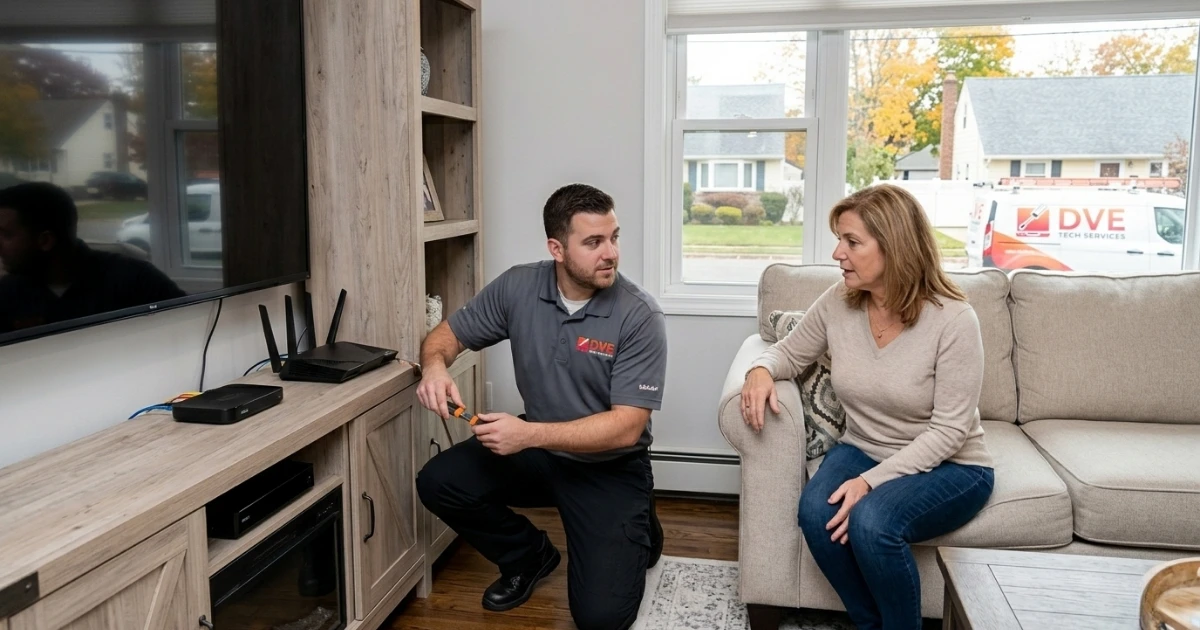
DVE Tech Services gives you expert wifi extender installation near North Wantagh, NY. We come to you. Our techs scan your home, find the dead zones, pick the best spot, set it up, and check your speeds before we leave. We cover all of Nassau County and the rest of Long Island.
What Is a WiFi Extender and How Does It Work?
A WiFi extender picks up your router signal and sends it further. It is also called a wireless range extender or WiFi booster.
Most extenders link to your router on the 2.4 GHz or 5 GHz band. Then they push a new signal into the weak area. Some models use a third band just to talk to the router. This keeps your speeds up.
A WiFi extender is not the same as a mesh network. A mesh system uses two or more nodes that all share one network name. An extender is a single add-on device. It works with your current router. For most North Wantagh and Nassau County homes with one or two dead zones, a wifi extender installation is the faster and cheaper fix. It works with any broadband plan, including Optimum and Verizon Fios.
WiFi Extender vs Mesh Network vs Powerline Adapter: Which One Do You Need?
Not every home needs the same fix. Here is a quick look at the three main options for Long Island homes:
For most homes in North Wantagh, Wantagh, and Levittown, a wifi extender installation is the best first step. If your home is over 3,000 sq ft or has many floors, a mesh system may work better. If walls are too thick for any wireless fix, a powerline adapter sends the signal through your home wiring.
Our WiFi Extender Installation Service: What Each Visit Includes
Every visit is a full job. We do not just plug in a device and go. We make sure your whole network works before we leave.
-
Signal scan: We check signal strength room by room using a network tool. We map all weak spots and dead zones in your home.
-
Device advice: We help you pick the right model if you do not have one yet. We work with TP-Link, Netgear, Eero, Linksys, Asus, and all big brands.
-
Best spot: We find the exact right place using signal data, your floor plan, and your wall type. This is where most DIY jobs go wrong.
-
Full wifi extender installation: We pair the device to your router, set the bands, fix the SSID, and tune the link.
-
Device link: We connect your phones, laptops, smart TVs, and smart home gear to the new network.
-
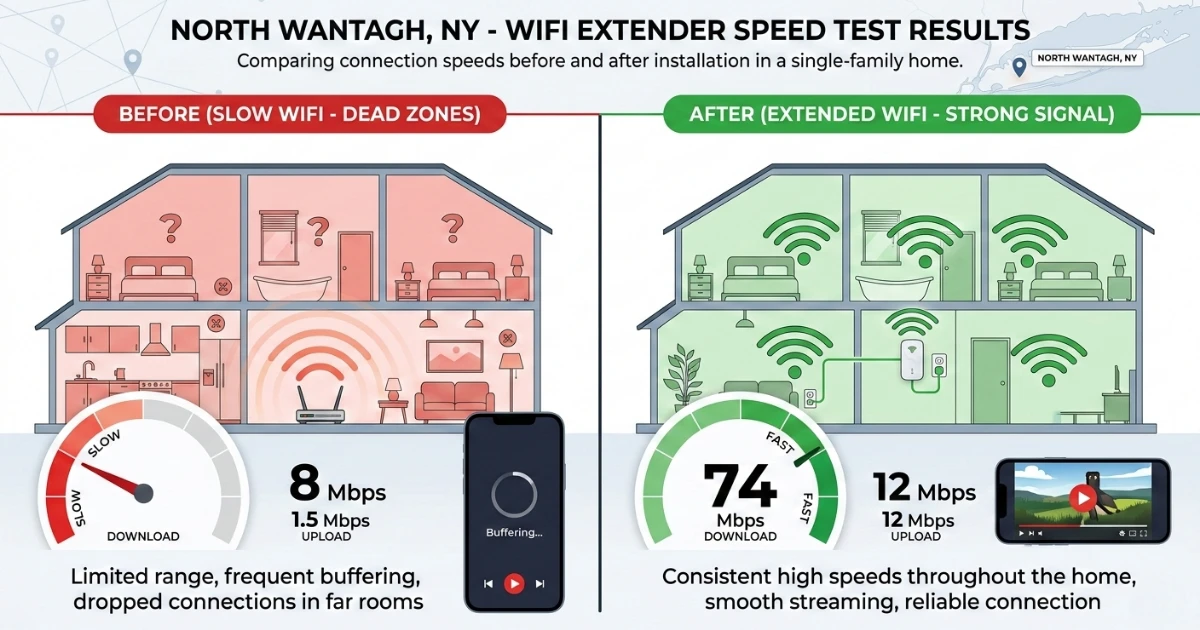
Speed test: We run speed checks before and after so you can see the gain.
-
Your walk-through: We show you how to add new devices, check signal, and reset the extender if needed.
We work with every brand and model. Need a tp link wifi extender installation? Done. Need help with an ac1200 wifi range extender installation or an ac750 wifi range extender installation? Covered. Want to know how to install a wifi extender from Netgear? Our how to install netgear wifi range extender service walks you through it on-site.
Where to Install a WiFi Extender: The Placement Guide
Knowing where to install wifi extender is the most key part of the job. A device in the wrong spot can make things worse.
Step 1: Use the Halfway Rule
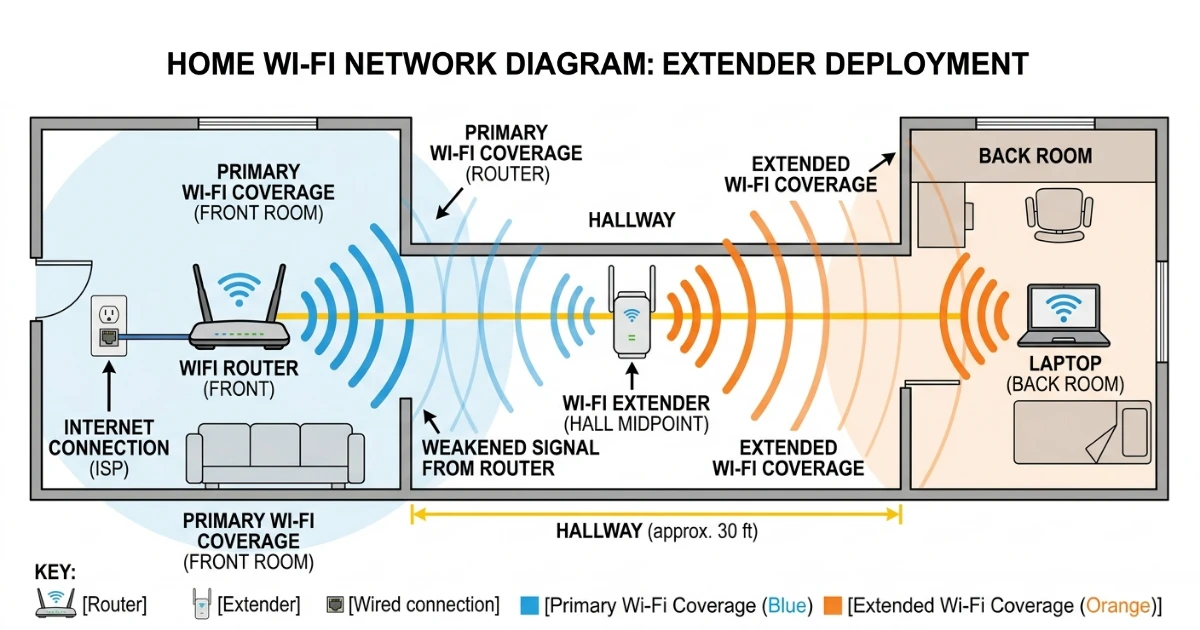
Put the extender halfway between your router and the dead zone. It picks up a good signal and pushes it forward. Do not put it inside the dead zone. By that point the signal is too weak to rebroadcast well.
Step 2: Go for Line of Sight
Each wall the signal passes through cuts your range. This is a form of wireless signal interference that adds up fast. Plaster walls in pre-1970 Long Island Capes and split-levels are the worst. Put the extender in an open spot. Keep as few walls as you can between it and your router and your devices. Doors, halls, and stairs help a lot.
Step 3: Place It at Mid-Height
A shelf or wall outlet at mid-height gives the best spread. Do not put it on the floor. Keep it away from big metal things like fridges and file cabinets. These block the signal.
Step 4: Pick the Right Band
Use 5 GHz to link the extender to your router when the router is close. It is faster and has less noise. Use 2.4 GHz when the router is far away. It has more range and goes through walls better. Newer WiFi 6E and WiFi 7 extenders also support the 6 GHz band. Most new extenders pick the right band on their own. Our techs check this for your home on every visit.
Step 5: Test Before You Lock It In
Use a network app or a speed test to check signal at the spot you picked. You want at least -65 dBm from the router. Below -70 dBm and it will not work well. The TP-Link range extender setup guide is a good read too. Our techs use pro-grade tools to test every spot before they install.
Common WiFi Problems We Fix Near North Wantagh
These are the issues we fix most for homes and small firms in North Wantagh, Levittown, Wantagh, Seaford, Massapequa, and Nassau County.
Dead Zones in Back Rooms, Basements, and Home Offices
Thick walls, concrete floors, and long gaps block the signal. It cannot reach the back of the house. We hear this a lot from homes near Sunrise Highway and Merrick Road. A wifi extender installation fills those gaps when placed right.
Slow Speeds Far from the Router
Fast speeds near the router but slow speeds in the back rooms is a range issue. It is not an ISP issue. It does not matter if you use Optimum or Verizon Fios. An extender, also called a wifi wireless range extender or signal booster, extends your reach so all rooms get strong speeds.
You Tried to Install WiFi Extender but It Still Does Not Work
Many clients come to us after a DIY try. The device is in place but speeds are still bad or devices keep dropping off. This is almost always a bad spot or wrong band setup. We fix what is there or start fresh. We do not leave until it works.
Smart Home and IoT Devices Going Offline
Smart locks, cameras, and IoT gear often sit far from the router. A weak signal makes them drop off. If you just got a smart lock installation in your North Wantagh or Plainedge home, it needs a strong signal to work right. A good wifi network installation with the right extender keeps all your devices online.
Too Many Devices on One Band
When too many devices share one band, speeds drop for all of them. A proper installation wifi setup splits the load across bands. Each device gets a better share. For home offices and small firms that need fast speeds for calls, our small business IT support and wifi network installation service can help.
Our 7-Step WiFi Extender Installation Process
Here is what happens when you book with DVE Tech Services:
-
Book a visit: Call (516) 867-3000 or book online. Tell us where your WiFi is weak. We set a time that works for you. Same-day and next-day slots are open all over Nassau County.
-
Signal check: Our tech comes to your home with a pro network tool. We scan every room and map all dead zones.
-
Device spot: We put the extender in the exact right place. We use signal data, your floor plan, and your wall type. If you want to learn how to install wifi extender models on your own later, we walk you through it.
-
Network pairing: We pair the extender to your router via WPS or manual setup. We set the right bands, assign a clean SSID, and tune the link.
-
Device test: We connect your phones, laptops, smart TVs, and smart home devices. We test all of them in the rooms that used to be weak.
-
Speed check: We run a final speed test in each weak room. We compare it to the start. We do not leave until results are solid.
-
Your walk-through: We show you how to add new devices, check the signal, and reset the extender if you need to. We leave you in full control.
Why North Wantagh Homeowners Pick DVE Tech Services
We Come to You Anywhere in Nassau County
Every job is on-site. You do not go anywhere. We come to North Wantagh and all nearby Long Island towns, seven days a week. Near Wantagh State Parkway, off Merrick Road, or near Sunrise Mall, we are there.
We Know Long Island Homes
Most DIY jobs fail due to a bad spot. Our techs have worked in hundreds of Nassau County homes. They know 1950s Levittown Capes and newer Massapequa colonials. We use signal data, your floor plan, and your wall type to find the best spot. We do not guess.
All Major Brands Supported
We work with every big brand: TP-Link, Netgear, Eero, Linksys, Asus, and more. A tp link wifi extender installation, an ac1200 wifi range extender installation, a how to install netgear wifi range extender job, or an ac750 wifi range extender installation, we cover it all.
Certified Techs
Our lead techs hold a CompTIA Network+ cert. You are not getting a basic handyman. You are getting a trained network pro who knows how routers, extenders, bands, and networks work.
Clear, Upfront Price
We give you a quote before we start. No hidden fees. The price we quote is what you pay. Call (516) 867-3000 for a fast quote on your wifi extender installation.
Trusted by North Wantagh and Nassau County Customers
Our work speaks for itself. Read our Google reviews to see what North Wantagh and Long Island clients say about working with DVE Tech Services.
Areas We Serve in Nassau County and Long Island
DVE Tech Services does wifi extender installation and wifi network installation all across North Wantagh and nearby Nassau County and Long Island towns. If you are looking for wifi extender installation near me, we are here:
-
North Wantagh (ZIP 11793) and Wantagh
-
Levittown and Hicksville
-
Bethpage and Plainedge
-
East Meadow and Uniondale
-
Plainview and Seaford
-
Farmingdale and Massapequa
-
Bellmore, Merrick, and Freeport
-
Garden City and Mineola
-
Westbury, Elmont, and Syosset
-
All Nassau County towns within 15 miles of North Wantagh
Not sure if we come to your address? Call (516) 867-3000. We will tell you right away.
FAQs About WiFi Extender Installation
How does a WiFi extender differ from a WiFi mesh system?
A WiFi extender is one device. It picks up your router signal and sends it out again. A wireless repeater works the same way but uses the same channel. This can cut usable speed. A mesh system uses two or more nodes as one network. Extenders cost less and are faster to set up. Mesh systems work better for big or multi-floor homes over 3,000 sq ft. For most Nassau County homes with a dead zone or two, a good extender is the right pick.
Where should I install a wifi extender in my home?
Put it halfway between your router and the dead zone. It needs a strong signal from the router to work well. Too far from the router and speeds will be low. Our techs use a pro signal tool to find the exact best spot for your home. This is where most DIY jobs go wrong.
Can I install wifi extender myself or do I need a pro?
Many extenders come with an app guide that walks you through how to install wifi extender on your own. Simple setups in open homes often work fine as DIY. But if your home has thick plaster walls, many floors, or you have already tried and it still does not work, a pro wifi extender installation saves time and gets real results. We do not leave until your speeds are better.
What is the gap between 2.4 GHz and 5 GHz for my extender?
The 2.4 GHz band has more range but lower speed. It goes through walls better. Use it when the extender is far from the router. The 5 GHz band is faster but has less range. Use it when the extender is close. Some extenders use both at once and pick the best band on their own. Newer WiFi 6E and WiFi 7 extenders also have a 6 GHz band for very fast short-range use.
How much does a pro wifi extender installation cost?
Cost depends on your home size, how many devices you have, and if you already own an extender. DVE Tech Services gives you a clear quote before work starts. No hidden fees. Call us at (516) 867-3000 for a fast, free quote. We often have same-day slots for Nassau County homes at no extra charge.
What ISPs do you work with in North Wantagh?
We work with all ISPs in Nassau County. This means Optimum and Verizon Fios, which are the two main ones in North Wantagh and nearby towns. Your ISP plan does not change our work. We tune your home network no matter who your provider is.
Other Tech Services from DVE Tech Services
WiFi setup is one part of a full home or office tech plan. DVE Tech Services also covers:
-
Laptop Repair near North Wantagh, NY: Screen fixes, new battery, keyboard faults, and slow device issues.
-
Desktop Computer Repair near North Wantagh: Hardware faults, heat issues, power problems, and OS recovery.
-
Smart Lock Installation in Plainedge and Levittown: Full setup of app and keypad locks from all big brands.
-
Printer and Scanner Setup: Wireless setup, driver install, and link fixes.
-
Small Business IT Support across Long Island: Network setup, fixes, and ongoing IT help for small firms.
-
Data Recovery: Lost files from broken drives, phones, and storage devices.
Book Your WiFi Extender Installation in North Wantagh Today
Tired of dead zones? Done trying to figure out how to install a wifi extender on your own? DVE Tech Services does the full job from start to end.
We serve North Wantagh (11793), Levittown, Wantagh, and all nearby Nassau County and Long Island areas. We come to you. We set it all up. We check that it works before we go. Need seamless IT solutions for your business? We cover that too.
Call or book today to:
-
Get a clear, upfront quote for wifi extender installation with no hidden fees
-
Book a same-day or next-day visit in Nassau County
-
Ask about full wifi network installation and whole-home coverage plans
-
Get expert advice on the best extender or wireless range extender for your home